Wednesday, October 18, 2006

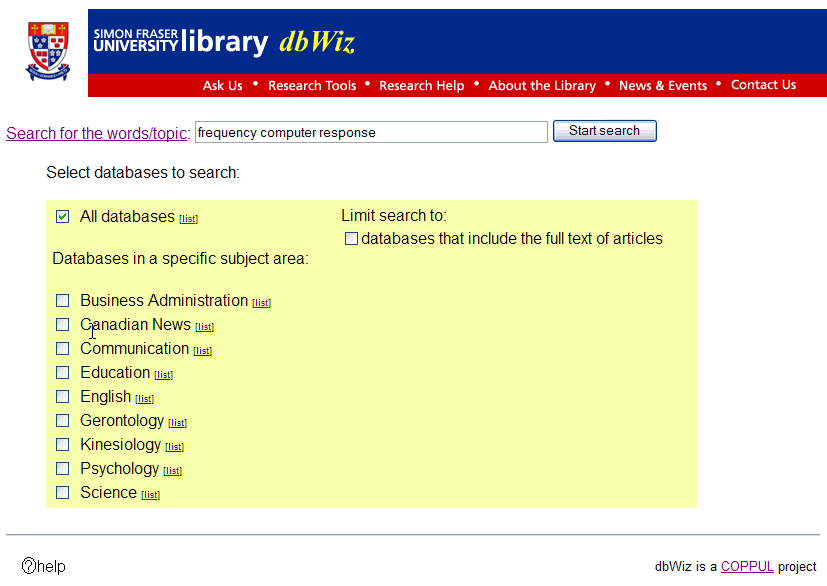
dbwiz -Federated Search Tool


dbWiz is an exciting federated search tool.dbWiz gives users of library resources a quick and effective means of choosing the right research resource.dbWiz gives librarians the ability to create a customized search profile,any number of databases can then be searched at a single point of access.

dbWiz is accessed via the web. The following web browsers have been tested and work with dbWiz:
  • Microsoft Internet Explorer 6.0 (Windows), 5.0 (Mac)
  • Mozilla (Mozilla Firebird 0.6.1)
The dbWiz Search Frontend is a CGI script.
  • Written in Perl (5.8)
  • Web server: Apache (1.3.27) running mod_perl
  • Operating System: Linux 2.4 (RedHat 8)

Parallel Searching Engine

  • Written in Perl
  • requires the following software:

Configuration Database

  • User interface written in Perl
  • Database MySQL (3.23) (http://www.mysql.com)
  • requires the following software:
    • perl module DBI
    • perl MySQL DBD


Instructions on installing dbWiz from our SVN source can be found here: http://cufts2.lib.sfu.ca:8033/trac/dbwiz/wiki

Presentation :http://www.sfu.ca/~kstranac/dbwiz/dbWizPreview.htm

Tuesday, October 17, 2006

Book:Neal-Schuman library technology companion : a basic guide for library staff "By John J. Burke


1-55570-398-4 . 2000 . 6 x 9 . 200 pp.
View Table of Contents

A wide range of technologies are now available to libraries for both public and technical services. As these technologies proliferate and change, library staff must understand what they are and their uses. This basic primer explains each type of technology and discusses its practicalities in the library environment. Among the topics covered are: evaluation, purchase, troubleshooting, planning, equipment, systems and networks, the Internet, electronic library resources, storage, formats, adaptive and assistive technology, security, and facilities. Burke concludes with a look at the future of information technology and its impact on libraries. An extensive glossary of technology terms and concepts completes the volume. Designed for all levels of library staff, this is both a handy reference and an ideal text for technology workshops and classes.


Reviews

“A basic primer…clear and simple.” Journal of Academic Librarianship
“Excellent…I do see it on the desk of every professional, paraprofessional, and library clerk. It is a companion that will certainly find much use…should be a solid addition to the collections of all types of libraries.” Reference & User Services Quarterly
"Also recommended for the more experienced who need an easy read and a reminder of what should be considered." Business Information Alert
“An excellent textbook for technology classes in library education programs, this book would also prove useful for three different populations. Library staff with little technological experience….Administrators….Solo librarians….Overall, this book is recommended for all libraries with staff who could use some help with technology issues.” Colorado Libraries
“Managers, library technicians, and professional staff who require a quick and readable overview of technological issues will benefit from the manageable size and scope of the handbook.” ARBA
“Anyone interested in developing library technology will find this a beneficial addition to the collection. Recommended.” Library Talk and Book Report


Monday, October 16, 2006

Book: Blogging and RSS A Librarian's Guide


Blogging and RSS
A Librarian's Guide
By Michael P. Sauers

Libraries increasingly use blogs and RSS feeds to reach out to users, while librarians blog daily on a range of personal and professional topics. The way has been paved by the tech-savvy and resource-rich, but any library or librarian can successfully create and syndicate a blog today. In this readable book, author, Internet trainer, and blogger Michael P. Sauers, M.L.S., shows how blogging and RSS technology can be easily and effectively used in the context of a library community. Sauers showcases interesting and useful blogs, shares insights from librarian bloggers, and offers step-by-step instructions for creating, publishing, and syndicating a blog using free Web-based services, software, RSS feeds, and aggregators.

November 006/296 pp/softbound
ISBN 1-57387-268-7
Regular Price: $29.50

XML family of specifications

Friday, October 13, 2006

RDF - Connecting Software and People

An short 30 minute in depth introduction to the Semantic Web for people with some Software engineering background. Presenting the problem ... all » of the Mythical Man Month, this shows how one can use an OWL Ontology, to describe the relation between people and software bugs. Makes the case that the best way to get the Semantic Web going is by opening up a valuable database to a SPARQL end point. presentation and more available at:http://blogs.sun.com/roller/page/bblfish/20060323

Wednesday, October 11, 2006

Technorati

Technorati Profile

Lucene: How to design your own Web search application ?

Apache Lucene is a high-performance, full-featured text search engine library written entirely in Java. It is a technology suitable for nearly any application that requires full-text search, especially cross-platform.

Apache Lucene is an open source project available for free download. Please use the links on the left to access Lucene.


How to design your own Web search application ?:

"Beef up Web search applications with Lucene"

by Deng Peng Zhou

mplement advanced search with Lucene

"Lucene supports several kinds of advanced searches, which I'll discuss in this section. I'll then demonstrate how to implement these searches with Lucene's Application Programming Interfaces (APIs).

Boolean operators

Most search engines provide Boolean operators so users can compose queries. Typical Boolean operators are AND, OR, and NOT. Lucene provides five Boolean operators: AND, OR, NOT, plus (+), and minus (-). I'll describe each of these operators.

  • OR: If you want to search for documents that contain the words "A" or "B," use the OR operator. Keep in mind that if you don't put any Boolean operator between two search words, the OR operator will be added between them automatically. For example, "Java OR Lucene" and "Java Lucene" both search for the terms "Java" or "Lucene."
  • AND: If you want to search for documents that contain more than one word, use the AND operator. For example, "Java AND Lucene" returns all documents that contain both "Java" and "Lucene."
  • NOT: Documents that contain the search word immediately after the NOT operator won't be retrieved. For example, if you want to search for documents that contain "Java" but not "Lucene," you may use the query "Java NOT Lucene." You cannot use this operator with only one term. For example, the query "NOT Java" returns no results.
  • +: The function of this operator is similar to the AND operator, but it only applies to the word immediately following it. For example, if you want to search documents that must contain "Java" and may contain "Lucene," you can use the query "+Java Lucene."
  • -: The function of this operator is the same as the NOT operator. The query "Java -Lucene" returns all of the documents that contain "Java" but not "Lucene."

Now look at how to implement a query with Boolean operators using Lucene's API. Listing 1 shows the process of doing searches with Boolean operators.

Full Article : here

by Deng Peng Zhou is a graduate student from Shanghai Jiaotong University. He works as an intern software engineer in IBM Shanghai Globalization Lab and is interested in Java technology and modern information retrieval. You can contact him at zhoudengpeng@yahoo.com.cn.